This guide provides an overview of every activity available from the Activity Explorer, explaining what it does, key features, how it can help an organisation and where to learn more. Curiosity’s platform has several data activities to support your test data management. To navigate to the data activities, underneath Enterprise Test Data select Data Activities > Activity Explorer > Add Activity.
The following data activities should be available to you:
DATABASE
FILE
GENERAL
Organising Data Activities
We highly recommend organising your Data Activities into a clear folder structure to make them easier to find, maintain, and revisit as your project grows.
When you first log in to the platform, a baseline folder structure is provided within Activity Explorer. From here, you can create additional folders and subfolders to organise activities in a way that makes sense for your team. For example, you may choose to group activities by project, environment, release, application, or activity type.
Creating Folders
To create a new folder:
Navigate to Activity Explorer.
Select the green "+" button located beside the existing folder structure.
Enter a name for the folder and save it.
Repeat this process to create additional folders or nested subfolders as required.
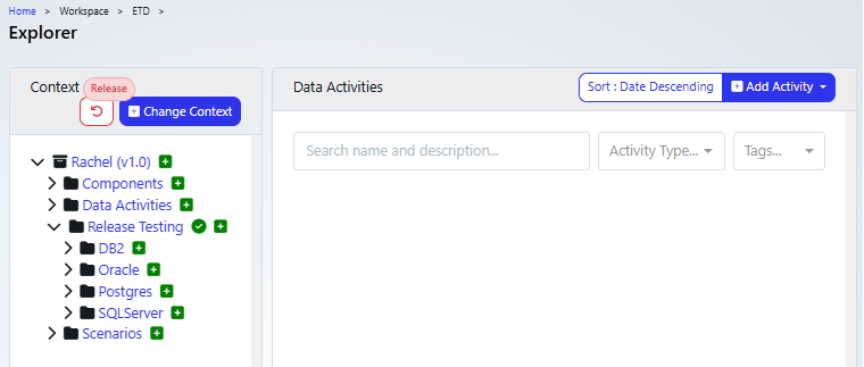
Navigating Folder Structures
Folders can be expanded and collapsed using the ">" icon beside the folder name. This allows you to navigate through your folder hierarchy and keep Activity Explorer organised and easy to read.
Creating Activities Within Folders
Once your folder structure has been created:
Navigate to the folder where you want the activity to be stored.
Expand any required parent folders using the ">" icon.
Create the new activity.
The activity will automatically be saved within the folder you are currently working in.
Moving Activities Between Folders
If an activity needs to be relocated:
Locate the activity within Activity Explorer.
Select the multi-directional arrow icon beside the activity.
A window displaying the available folder structure will appear.
Navigate to the target folder.
Select OK to move the activity.

Using a logical folder structure from the outset will help keep your Data Activities organised, improve collaboration across teams, and make it much easier to locate activities as your repository grows.
Data Activities
Compare Database
About: Helps organisations validate releases, migrations and testing outcomes by highlighting exactly what changed between two points in time.
Key Features:
Compare schemas, databases and snapshots
Support high-watermark and snapshot comparisons
Identify inserts, updates and changes
Typical Use Cases: Release validation, migration testing, defect investigation
Cross Definition FK Discovery
About: Useful when database relationships are undocumented or incomplete.
Key Features:
Discover potential relationships
Analyse legacy schemas
Improve model understanding
Typical Use Cases: Legacy modernisation, subsetting preparation
Data Generation
About: Provides safe, realistic data without relying on production records.
Key Features:
Generate synthetic data
Configure generation rules
Support referential integrity
Typical Use Cases: Testing, development, performance testing
Find Data
About: Reduces effort spent manually searching for suitable test data.
Key Features:
Locate existing test records
Support self-service data access
Typical Use Cases: Test execution support
Machine Learning
About: Helps identify trends and relationships that may improve test data quality.
Key Features:
Pattern analysis
AI-assisted discovery
Typical Use Cases: Data exploration
Mask Database
About: Protects sensitive information while keeping data usable in non-production environments.
Key Features:
Replace sensitive values
Use reusable masking rules
Support compliance initiatives
Typical Use Cases: GDPR compliance, test environments
Scan Database
About: Provides visibility of the data landscape and builds the foundation for governance and test data projects.
Key Features:
Profile schemas and columns
Identify sensitive data
Calculate statistics and classifications
Typical Use Cases: Data discovery, compliance reviews
Subset Database
About: Creates smaller, easier-to-manage environments while reducing costs and refresh times.
Key Features:
Extract targeted datasets
Reduce environment size
Retain relevant business context
Typical Use Cases: ERP testing, environment optimisation
Transform Data
About: Improves compatibility between source and target systems.
Key Features:
Transform and reshape data
Support migrations
Typical Use Cases: Migration projects
Validate Database Data
About: Improves confidence in data quality.
Key Features:
Validate business rules
Identify invalid records
Discover hidden relationships
Typical Use Cases: Data quality programmes
Windocks – Build Image
About: Enables repeatable environment provisioning.
Key Features:
Build container images
Support automation
Typical Use Cases: DevOps
Windocks – Create Container
About: Accelerates environment delivery.
Key Features:
Create containers on demand
Provision environments quickly
Typical Use Cases: Testing and development
Complex Data Sets
About: Improves test coverage while reducing the number of records required.
Key Features:
Pairwise generation
Business-rule-driven datasets
Coverage-focused combinations
Typical Use Cases: Functional testing
Data Pattern Generation AI
About: Creates realistic synthetic data while protecting privacy.
Key Features:
Analyse source datasets
Generate statistically similar data
Preserve data characteristics
Typical Use Cases: Analytics and testing
File Masking
About: Allows files to be shared and tested safely.
Key Features:
Mask sensitive file data
Protect file-based datasets
Typical Use Cases: File testing
Message Management
About: Improves repeatability of integration testing.
Key Features:
Manage messages and payloads
Support integrations
Typical Use Cases: API and messaging validation
Scan Files
About: Extends discovery capabilities beyond databases.
Key Features:
Analyse file contents
Identify sensitive information
Typical Use Cases: File governance
Data Probability Analysis
About: Uncovers patterns that can improve synthetic data and testing strategies.
Key Features:
Apriori analysis
Discover relationships
Identify potential business rules
Typical Use Cases: Data analysis
General All Purpose
About: Supports bespoke business requirements.
Key Features:
Flexible workflow framework
Typical Use Cases: Custom processes
Pipeline
About: Reduces manual effort by combining activities into repeatable processes.
Key Features:
Orchestrate activities
Automate workflows
Typical Use Cases: End-to-end automation
Pipeline (Data Gen)
About: Accelerates continuous test data delivery.
Key Features:
Automated data generation pipelines
Typical Use Cases: CI/CD
Data Monitoring
About: Provides continuous visibility into the enterprise test data landscape.
Key Features:
Compliance monitoring
Trend analysis
Proactive alerts
AI-driven insights
Typical Use Cases: Governance and optimisation